What Actually Happens When Claude Calls Search Console Through MCP
One question to Claude becomes five steps: tool discovery, OAuth, a JSON-RPC call, a Google API request and a compact result. Real traces from a live MCP server.
 Łukasz Blania · · 11 min read
 When you ask Claude “which pages lost traffic?”, five things happen: the client reads the server’s tool list, signs in once through OAuth discovery, sends one JSON-RPC tools/call request, the MCP server queries Google with its own token, and a compact result goes back to the model. The expensive part is usually not the data. It is the tool list, which the model reads at the start of every conversation.
Most explanations of the Model Context Protocol stop at “it connects AI to your tools”. That sentence is true and useless. If you want to judge whether an MCP server is safe, fast or cheap to run, you need to see what crosses the wire.
So here is one request, traced end to end against a real server: GSC Magic, the hosted Search Console MCP server I build. Every JSON document below was fetched from production or printed by the server itself on October 24, 2026. Where I show numbers from Search Console, they are real numbers from gscmagic.com, a site that was about two weeks old at the time.
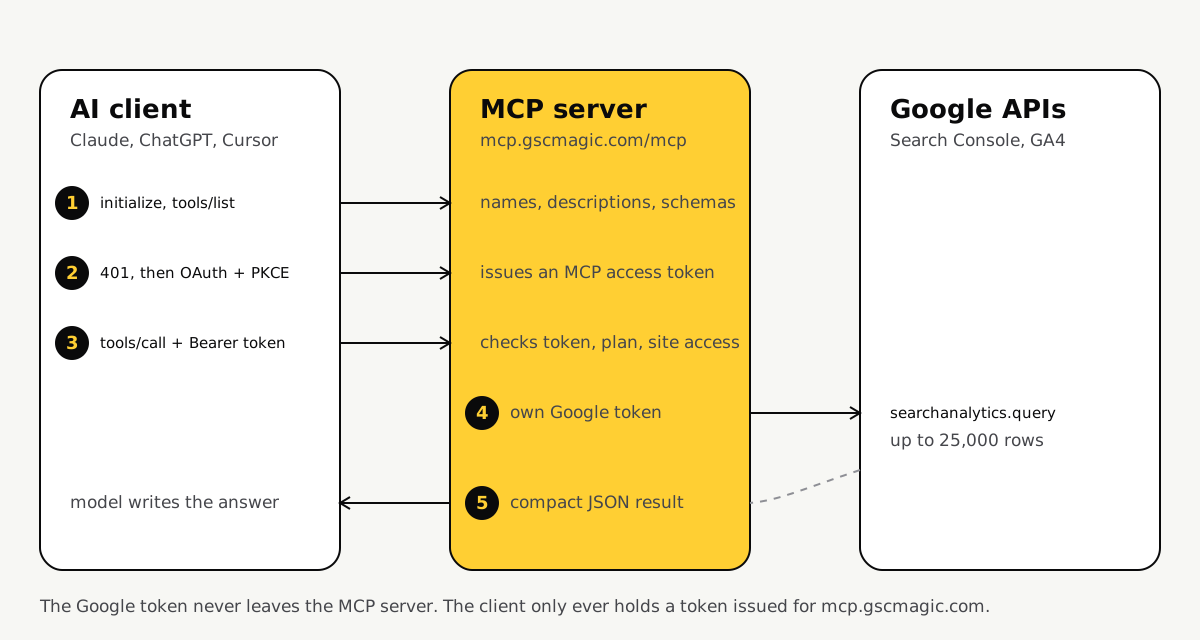
Step 1: before your first question, the client downloads a menu
The client starts every session by asking the server what it can do. The answer is a list of tool names, descriptions and JSON schemas, and the model reads all of it as input.
An MCP session opens with two JSON-RPC messages. initialize agrees on a protocol version and capabilities. tools/list returns the menu. This is the real initialize result from the GSC Magic server:
{
  "protocolVersion": "2025-06-18",
  "capabilities": { "tools": { "listChanged": true } },
  "serverInfo": { "name": "gsc-magic-mcp", "version": "0.1.0" }
}
Then the menu. One entry describes one tool. Here is a shortened version of the real gsc_query_analytics entry:
{
  "name": "gsc_query_analytics",
  "title": "Search performance (clicks, impressions, CTR, position)",
  "description": "Query Google Search performance data grouped by dimensions (query, page, country, device, searchAppearance, date, hour) with filters. A single Search Analytics query returns at most 25,000 rows...",
  "inputSchema": {
    "type": "object",
    "properties": {
      "site": { "type": "string" },
      "range": { "type": "string", "enum": ["last_7_days", "last_28_days", "last_3_months"] },
      "dimensions": { "type": "array", "items": { "enum": ["query", "page", "country", "device", "date"] } }
    },
    "required": ["site"]
  }
}
The full entry for that one tool is 3,036 characters. With every read-only toolset switched on, the server’s whole tools/list response is 57 tools and 47,775 characters. A rough rule of four characters per token puts that near 12,000 tokens. Treat that as an estimate, because the real count depends on the model’s tokenizer.
Why does this matter? Anthropic’s tool use documentation is explicit that tool names, descriptions and schemas are billed as input tokens, plus a small tool-use system prompt on top. Every conversation pays for the menu before it pays for a single row of data.
That is the first design trade-off of any MCP server. More tools means more things the model can do and more context burned on each turn. It is why GSC Magic ships Google Analytics and Tag Manager as opt-in toolsets in local mode, and why newer clients add tool search so large menus are loaded on demand.
Step 2: signing in is discovery, not configuration
A remote MCP server does not ask you to paste API keys. It answers the first unauthenticated request with a 401 that tells the client where to sign in.
The first real request from a fresh client gets this response from https://mcp.gscmagic.com/mcp:
HTTP/1.1 401 Unauthorized
WWW-Authenticate: Bearer error="invalid_token",
  error_description="Missing Authorization header",
  resource_metadata="https://mcp.gscmagic.com/.well-known/oauth-protected-resource/mcp"
That header is required. The MCP authorization specification says servers MUST use WWW-Authenticate on a 401 to point at their Protected Resource Metadata (RFC 9728). The client follows it:
{
  "resource": "https://mcp.gscmagic.com/mcp",
  "authorization_servers": ["https://api.gscmagic.com/"],
  "resource_name": "GSC Magic"
}
Now the client knows who issues tokens. It fetches that server’s metadata (RFC 8414):
{
  "issuer": "https://api.gscmagic.com/",
  "authorization_endpoint": "https://api.gscmagic.com/authorize",
  "token_endpoint": "https://api.gscmagic.com/token",
  "registration_endpoint": "https://api.gscmagic.com/register",
  "code_challenge_methods_supported": ["S256"],
  "grant_types_supported": ["authorization_code", "refresh_token"]
}
Three details in that document do the heavy lifting.
registration_endpointenables Dynamic Client Registration (RFC 7591). Claude registers itself as a client without you creating anything in a developer console.S256means PKCE. The client invents a secret, sends only its hash with the sign-in request and proves it knows the secret when it collects the token. A stolen authorization code is useless without it. The specification makes PKCE a MUST for clients.- The client also sends a
resourceparameter (RFC 8707), so the token it receives is bound tomcp.gscmagic.comand nothing else.
Then a browser window opens, you sign in with Google on the MCP server’s own page, and you approve access. You do this once. The client stores the MCP token and a refresh token.
Step 3: a question becomes one JSON-RPC call
The model does not “browse” your data. It picks one tool by reading descriptions, fills in arguments that match the schema and sends a single tools/call request.
You type: which pages lost traffic this month? The model compares your sentence with the menu from step 1. The tool whose description best matches wins, and the schema tells the model which arguments are legal. The request that leaves the client looks like this (illustrative arguments, real shape):
{
  "jsonrpc": "2.0",
  "id": 7,
  "method": "tools/call",
  "params": {
    "name": "report_traffic_drops",
    "arguments": { "site": "gscmagic.com", "range": "last_28_days" }
  }
}
It travels over HTTPS with Authorization: Bearer <MCP token>. The specification requires that header on every request, even inside one session, and forbids tokens in the URL.
This is also where you learn why tool descriptions read like warnings. The real gsc_query_analytics description spells out the 25,000-row limit and when results are truncated. The model has no other way to know. A vague description produces wrong calls, and a wrong call costs a full round trip.
Step 4: the server talks to Google with a different token
The MCP token never reaches Google. The server validates it, then calls the Search Console API with a separate Google token that it keeps encrypted on its side.
When the request arrives, GSC Magic does four checks before Google sees anything: the token is valid and was issued for this server, the account’s plan allows the tool, the site belongs to the account (or to the client group a team member is allowed to see), and the daily and monthly call limits are not exceeded.
Only then does it call Google. The Google refresh token is stored with AES-256-GCM encryption and decrypted in memory for the request.
This separation is not my preference. It is the rule. The MCP specification says a server MUST NOT pass through the token it received from the client, because a server that forwards tokens becomes a “confused deputy” that other services trust by mistake.
The Google side has its own physics. According to Google’s Search Analytics API reference, one request returns at most 25,000 rows, 1,000 by default, and Google “does not guarantee to return all data rows but rather top ones”. Fresh data is available with dataState: all, but anything after first_incomplete_date “may still change noticeably”. A careful MCP server has to carry those caveats back to the model, or the model will present partial numbers as final.
Step 5: what comes back decides the bill
Raw rows are cheap for Google and expensive for the model. The useful work happens when the server reduces thousands of rows to the few numbers that answer the question.
Here is a real slice of what Search Console returned for gscmagic.com, grouped by date:
{ "date": "2026-10-18", "clicks": 2, "impressions": 156, "position": 64.9 }
{ "date": "2026-10-19", "clicks": 1, "impressions": 130, "position": 55.9 }
{ "date": "2026-10-20", "clicks": 0, "impressions": 230, "position": 65.3 }
Each row is roughly 70 to 100 characters of JSON. Now do the arithmetic for a busy site. A full 25,000-row export at about 100 characters a row is around 2.5 million characters, which by the same rough rule is more than 600,000 tokens (an estimate, not a measurement). That does not fit in most context windows, and it would be absurdly expensive if it did.
So there are two honest ways to build this.
| Approach | What the model receives | Good for |
|---|---|---|
| Raw passthrough | Rows exactly as Google returns them, paginated | Small sites, ad hoc questions, debugging |
| Server-side reports | A short ranked answer, such as the top pages that lost clicks with before and after numbers | Large sites, repeated checks, low token budgets |
GSC Magic does both. gsc_query_analytics gives raw rows with explicit truncation flags, and report tools such as report_traffic_drops or report_quick_wins run the comparison on the server and return a short list. The model then spends its tokens on explaining, not on adding up.
What this means when you choose an MCP server
Judge an MCP server by four things you can verify yourself: how it signs you in, which token reaches Google, how big its tool list is and how it handles large results.
- Sign-in. A remote server should answer 401 with a
resource_metadatalink and support PKCE. If it asks you to paste a Google API key into the chat client, it is not following the specification. - Token separation. Ask where the Google token lives and whether the client token is ever forwarded. The correct answer is “on the server, never”.
- Menu size. Count the tools. A long list costs context in every conversation, so prefer servers that let you switch toolsets off.
- Result shape. Check whether the server reports truncation and offers summarized reports. Silent truncation is how an AI ends up confidently wrong about your traffic.
If you want to see these steps on your own site, the Claude setup guide takes about a minute, and the MCP integration page lists the endpoint and token options for other clients. For the security side of the same flow, read Is a Google Search Console MCP server safe?.
Questions people ask about how MCP works
Does Claude see my Google password or Google token when it uses an MCP server?
No. You sign in with Google on the MCP server’s own page. Claude only receives an access token issued for the MCP server, and the MCP specification forbids the server from passing that token on to Google. The Google token stays on the server.
Why does connecting an MCP server use up context before I ask anything?
The client loads the server’s tool list at the start of a conversation. Every tool name, description and input schema is sent to the model as input. A large server can add thousands of tokens to each conversation before the first question.
How many rows can one Search Console request return?
Google’s Search Analytics API returns up to 25,000 rows per request and 1,000 by default. Larger datasets need pagination with startRow, and Google does not guarantee every row, only the top ones.
Is MCP the same as the Search Console API?
No. The Search Console API is Google’s interface for programs. MCP is a protocol that lets an AI client discover and call tools. An MCP server for Search Console is a program that speaks MCP to the AI and calls the Search Console API on your behalf. The MCP vs API comparison goes deeper into when each one fits.
Łukasz builds GSC Magic, the MCP server that gives AI agents access to Google Search Console, Bing Webmaster Tools and GA4. He writes about using Search Console data with Claude, ChatGPT and coding agents, and about the SEO workflows those tools make possible.
lukaszblania.comgithub.com/lumizoneGive your agent your search data.
GSC Magic connects Claude, ChatGPT and Cursor to Google Search Console, Bing and GA4. Free plan, 7-day Pro trial, no card.