A weekly client update
Send it straight to the client with your agency name, or to yourself first.
The same GA4 data as the Slack version, as a clean weekly email you can send to a client with your agency name and color.
Last updated: 2026-11-24
The AI assistant traffic report as a branded weekly email: per-assistant share, engagement and the pages AI visitors land on.
Built for GEO and AEO agencies that send clients a weekly number. Core n8n nodes only: GSC Magic is called with the HTTP Request node, so the template runs on n8n Cloud and self-hosted without a community node.
This week, the week before and the landing pages, filtered to known AI assistant sources.
Headline sentence, four number tiles, a row per assistant with its share of AI traffic, and where the visits land.
A quiet week or a failed report still sends a short email that says why.
Send it straight to the client with your agency name, or to yourself first.
The person who asks about AI traffic gets one email a week instead of a GA4 login.
A dated weekly record of which assistants send visits and to which pages.
Built from the GA4 data of gscmagic.com for the week to 23 November: 3 sessions from ChatGPT against 8 the week before, landing on the home page and the pricing page.
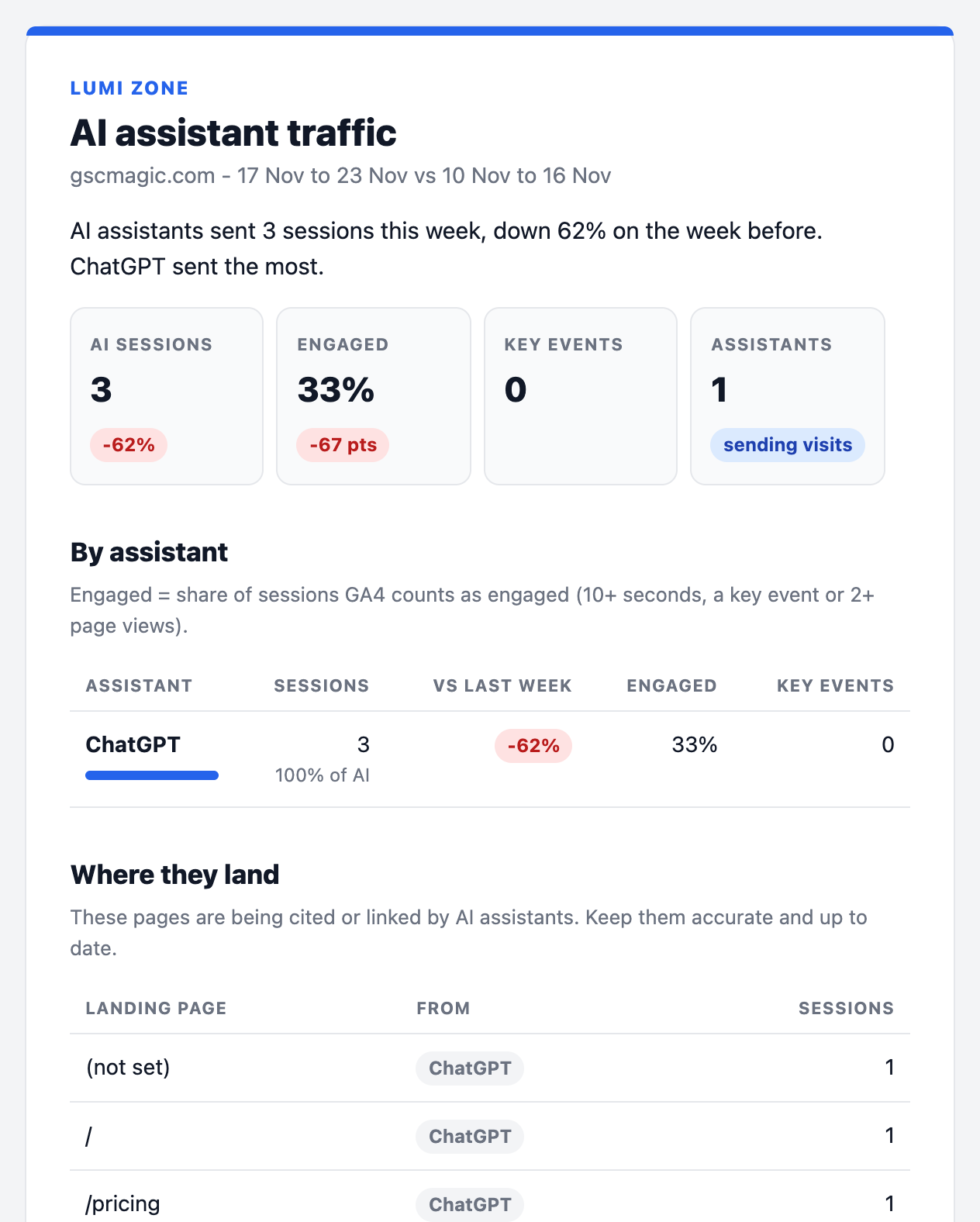
What it means: A quiet week shows as a quiet week: the email reports the drop from 8 to 3 sessions instead of hiding it. Over 28 days the same site had 37 ChatGPT sessions, so a weekly email is where you notice a dip before it becomes a trend.
Every step is also written in the sticky notes inside the workflow, next to the nodes it refers to.
Yes. Put the client's address in recipientEmail and your agency name in senderName. Several addresses can be separated by commas.
You still get a short email that says so, with three practical ways to get cited by AI assistants.
Yes. Replace the SMTP email node with the Gmail node and map the subject and HTML fields.
Every Monday: sessions from ChatGPT, Perplexity, Claude, Gemini and Copilot from GA4, against the week before, in Slack.
See the template →On the 1st, a branded email for your client: the month in numbers, a daily clicks chart, pages that moved and three opportunities.
See the template →More free templates: Weekly client digest in Slack · New page indexing alerts · IndexNow on publish + Google check · Google vs Bing page gaps · Content decay to Trello cards · Quick wins with AI drafts in Sheets · New client SEO audit form · all n8n templates