Retainer reporting
The client gets the month on the 1st, every month, with the same structure.
The monthly update that goes out on time without building it in a dashboard tool. Review mode sends it to you first.
Last updated: 2026-11-24
On the 1st, a branded email for your client: the month in numbers, a daily clicks chart, pages that moved and three opportunities.
Built for agencies and freelancers who send a client a monthly update. Core n8n nodes only: GSC Magic is called with the HTTP Request node, so the template runs on n8n Cloud and self-hosted without a community node.
Reads the client from Settings and works out last month's dates. Missing details get a "not sent" email and cost no calls.
Daily clicks with a chart, top movers against the previous period, and opportunities.
A headline sentence, four number tiles, the daily chart, pages that moved and three opportunities, in your brand color.
The client gets the month on the 1st, every month, with the same structure.
Review mode sends the report to you; turn it off once you trust it.
A professional report without a reporting tool subscription. Duplicate the workflow for each client.
The report built from localwaifu.com data for October 2026, against the 31 days before.
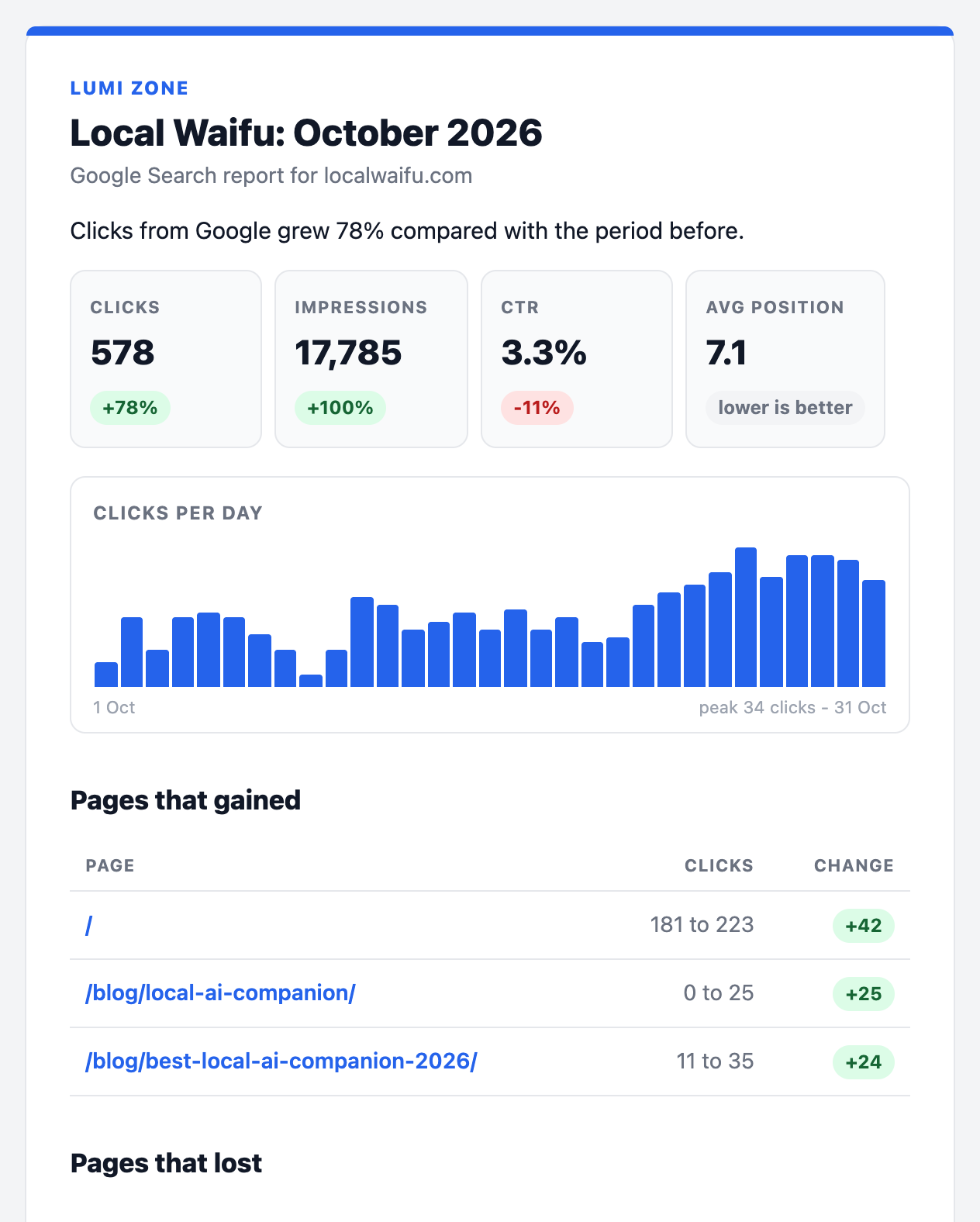
What it means: Growth and the two small losses sit in one view, with page names a client can act on. That is the conversation a monthly report should start.
Every step is also written in the sticky notes inside the workflow, next to the nodes it refers to.
An email with your agency name, the month in four numbers, a daily clicks chart, pages that gained and lost, and three opportunities. The chart is also attached as a PNG.
Duplicate the workflow, one per client. Each copy makes three GSC Magic calls a month.
Search Console finalizes data two to three days late, so the last days can still grow slightly after the 1st.
Every Monday, one Slack message with each client site's week: down, up, steady, and the pages behind the change.
See the template →The AI assistant traffic report as a branded weekly email: per-assistant share, engagement and the pages AI visitors land on.
See the template →More free templates: New page indexing alerts · IndexNow on publish + Google check · AI assistant traffic in Slack · Google vs Bing page gaps · Content decay to Trello cards · Quick wins with AI drafts in Sheets · New client SEO audit form · all n8n templates